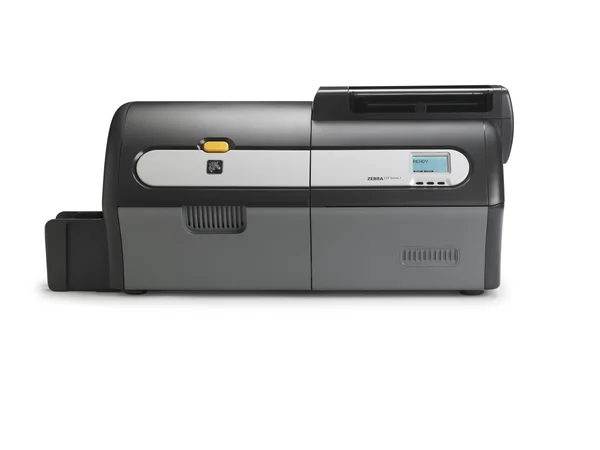
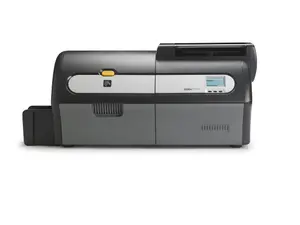
| Printer ZXP Series 7; Single Sided, US Cord, USB, 10/100 Ethernet | Z71-000C0000US00 | $3,405.00 Original price was: $3,405.00.$2,894.00Current price is: $2,894.00. |
| Printer, ZXP Series 7; Single Sided, US Cord, USB, 10/100 Ethernet, TAA | Z71-000C000GUS00 | $3,405.00 Original price was: $3,405.00.$2,894.00Current price is: $2,894.00. |
| Printer ZXP Series 7; Single Sided, US Cord, USB, 10/100 Ethernet, Contact Station | Z71-E00C0000US00 | $3,622.00 Original price was: $3,622.00.$3,079.00Current price is: $3,079.00. |
| Printer ZXP Series 7; Single Sided, US Cord, USB, 10/100 Ethernet, ISO HiCo/LoCo Mag S/W selectable | Z71-0M0C0000US00 | $3,947.00 Original price was: $3,947.00.$3,355.00Current price is: $3,355.00. |
| Printer ZXP Series 7; Single Sided, US Cord, USB, 10/100 Ethernet, Media Starter Kit | Z71-000CD000US00 | $3,992.00 Original price was: $3,992.00.$3,393.00Current price is: $3,393.00. |
| Printer ZXP Series 7; Single Sided, US Cord, USB, 10/100 Ethernet & 802.11 Wireless | Z71-000W0000US00 | $4,472.00 Original price was: $4,472.00.$3,802.00Current price is: $3,802.00. |
| Printer, ZXP Series 7; Single Sided, US Cord, USB, 10/100 Ethernet, ISO HiCo/LoCo Mag S/W Selectable, TAA | Z71-0M0C000GUS00 | $4,472.00 Original price was: $4,472.00.$3,802.00Current price is: $3,802.00. |
| Printer ZXP Series 7; Single Sided, US Cord, USB, 10/100 Ethernet & 802.11 Wireless, ISO HiCo/LoCo Mag S/W selectable | Z71-0M0W0000US00 | $4,491.00 Original price was: $4,491.00.$3,818.00Current price is: $3,818.00. |
| Printer ZXP Series 7; Dual Sided, US Cord, USB, 10/100 Ethernet, ISO HiCo/LoCo Mag S/W selectable | Z72-0M0C0000US00 | $4,670.00 Original price was: $4,670.00.$3,969.00Current price is: $3,969.00. |
| Printer, ZXP Series 7; Dual Sided, US Cord, USB, 10/100 Ethernet, ISO HiCo/LoCo Mag S/W Selectable, TAA | Z72-0M0C000GUS00 | $4,670.00 Original price was: $4,670.00.$3,969.00Current price is: $3,969.00. |
| Printer ZXP Series 7; Dual Sided, US Cord, USB, 10/100 Ethernet | Z72-000C0000US00 | $4,675.00 Original price was: $4,675.00.$3,974.00Current price is: $3,974.00. |
| Printer, ZXP Series 7; Dual Sided, US Cord, USB, 10/100 Ethernet, TAA | Z72-000C000GUS00 | $4,675.00 Original price was: $4,675.00.$3,974.00Current price is: $3,974.00. |
| Printer ZXP Series 7; Dual Sided, US Cord, USB, 10/100 Ethernet, Media Starter Kit | Z72-000CD000US00 | $4,860.00 Original price was: $4,860.00.$4,131.00Current price is: $4,131.00. |
| Printer ZXP Series 7; Dual Sided, US Cord, USB, 10/100 Ethernet, Contact Station | Z72-E00C0000US00 | $4,921.00 Original price was: $4,921.00.$4,183.00Current price is: $4,183.00. |
| Printer ZXP Series 7; Single Sided, US Cord, USB, 10/100 Ethernet, Contact and Contactless Mifare | Z71-A00C0000US00 | $5,083.00 Original price was: $5,083.00.$4,320.00Current price is: $4,320.00. |
| Printer ZXP Series 7; Dual Sided, US Cord, USB, 10/100 Ethernet, Contact and Contactless Mifare | Z72-A00C0000US00 | $5,207.00 Original price was: $5,207.00.$4,426.00Current price is: $4,426.00. |
| Printer ZXP Series 7; Dual Sided, US Cord, USB, 10/100 Ethernet, ISO HiCo/LoCo Mag S/W selectable, Media Starter Kit | Z72-0M0CD000US00 | $5,476.00 Original price was: $5,476.00.$4,655.00Current price is: $4,655.00. |
| Printer ZXP Series 7; Dual Sided, US Cord, USB, 10/100 Ethernet, ISO HiCo/LoCo Mag S/W selectable, Enclosure Lock | Z72-0MAC0000US00 | $5,537.00 Original price was: $5,537.00.$4,707.00Current price is: $4,707.00. |
| Printer ZXP Series 7; Dual Sided, US Cord, USB, 10/100 Ethernet, Contact Station, ISO HiCo/LoCo Mag S/W selectable | Z72-EM0C0000US00 | $5,537.00 Original price was: $5,537.00.$4,707.00Current price is: $4,707.00. |
| Printer ZXP Series 7; Single Sided, US Cord, USB, 10/100 Ethernet, Contact and Contactless Mifare, ISO HiCo/LoCo Mag S/W selectable | Z71-AM0C0000US00 | $5,698.00 Original price was: $5,698.00.$4,843.00Current price is: $4,843.00. |
| Printer ZXP Series 7; Dual Sided, US Cord, USB, 10/100 Ethernet, Linear Barcode Scanner | Z72-000C0B00US00 | $5,751.00 Original price was: $5,751.00.$4,889.00Current price is: $4,889.00. |
| Printer ZXP Series 7; Dual Sided, US Cord, USB, 10/100 Ethernet, Contact Station, ISO HiCo/LoCo Mag S/W selectable, Media Starter Kit | Z72-EM0CD000US00 | $5,969.00 Original price was: $5,969.00.$5,074.00Current price is: $5,074.00. |
| Printer ZXP Series 7 PRO; Dual Sided, US Cord, USB, 10/100 Ethernet, ISO HiCo/LoCo Mag S/W selectable, High Capacity Output Hopper | Z72-0M0C00H0US00 | $6,175.00 Original price was: $6,175.00.$5,249.00Current price is: $5,249.00. |
| Printer ZXP Series 7; Dual Sided, US Cord, USB, 10/100 Ethernet, Contact and Contactless Mifare, ISO HiCo/LoCo Mag S/W selectable | Z72-AM0C0000US00 | $6,326.00 Original price was: $6,326.00.$5,378.00Current price is: $5,378.00. |
| Printer ZXP Series 7; Dual Sided, US Cord, USB, 10/100 Ethernet, Contact and Contactless Mifare, ISO HiCo/LoCo Mag S/W selectable, Enclosure Lock | Z72-AMAC0000US00 | $6,762.00 Original price was: $6,762.00.$5,748.00Current price is: $5,748.00. |
| Printer ZXP Series 7; Dual Sided, US Cord, USB, 10/100 Ethernet, ISO HiCo/LoCo Mag S/W selectable, Linear Barcode Scanner | Z72-0M0C0B00US00 | $7,132.00 Original price was: $7,132.00.$6,063.00Current price is: $6,063.00. |
| Printer ZXP Series 7; Dual Sided, Single-Sided Lamination, US Cord, USB, 10/100 Ethernet | Z73-000C0000US00 | $7,797.00 Original price was: $7,797.00.$6,628.00Current price is: $6,628.00. |
| Printer, ZXP Series 7; Dual Sided, Single-Sided Lamination, US Cord, USB, 10/100 Ethernet, TAA | Z73-000C000GUS00 | $7,797.00 Original price was: $7,797.00.$6,628.00Current price is: $6,628.00. |
| Printer ZXP Series 7; Dual Sided, Dual-Sided Lamination, US Cord, USB, 10/100 Ethernet | Z74-000C0000US00 | $7,931.00 Original price was: $7,931.00.$6,742.00Current price is: $6,742.00. |
| Printer, ZXP Series 7; Dual Sided, Dual-Sided Lamination, US Cord, USB, 10/100 Ethernet, TAA | Z74-000C000GUS00 | $7,931.00 Original price was: $7,931.00.$6,742.00Current price is: $6,742.00. |
| Printer ZXP Series 7; Dual Sided, Dual-Sided Lamination, US Cord, USB, 10/100 Ethernet, Contact Station | Z74-E00C0000US00 | $8,148.00 Original price was: $8,148.00.$6,926.00Current price is: $6,926.00. |
| Printer ZXP Series 7; Dual Sided, Single-Sided Lamination, US Cord, USB, 10/100 Ethernet, ISO HiCo/LoCo Mag S/W selectable | Z73-0M0C0000US00 | $8,414.00 Original price was: $8,414.00.$7,152.00Current price is: $7,152.00. |
| Printer, ZXP Series 7; Dual Sided, Single-Sided Lamination, US Cord, USB, 10/100 Ethernet, ISO HiCo/LoCo Mag S/W Selectable, TAA | Z73-0M0C000GUS00 | $8,414.00 Original price was: $8,414.00.$7,152.00Current price is: $7,152.00. |
| Printer ZXP Series 7; Dual Sided, Dual-Sided Lamination, US Cord, USB, 10/100 Ethernet & 802.11 Wireless | Z74-000W0000US00 | $8,474.00 Original price was: $8,474.00.$7,203.00Current price is: $7,203.00. |
| Printer ZXP Series 7; Dual Sided, Dual-Sided Lamination, US Cord, USB, 10/100 Ethernet, ISO HiCo/LoCo Mag S/W selectable | Z74-0M0C0000US00 | $8,474.00 Original price was: $8,474.00.$7,203.00Current price is: $7,203.00. |
| Printer, ZXP Series 7; Dual Sided, Dual-Sided Lamination, US Cord, USB, 10/100 Ethernet, ISO HiCo/LoCo Mag S/W Selectable, TAA | Z74-0M0C000GUS00 | $8,474.00 Original price was: $8,474.00.$7,203.00Current price is: $7,203.00. |
| Printer ZXP Series 7; Dual Sided, Dual-Sided Lamination, US Cord, USB, 10/100 Ethernet, ISO HiCo/LoCo Mag S/W selectable, Enclosure Lock | Z74-0MAC0000US00 | $8,691.00 Original price was: $8,691.00.$7,388.00Current price is: $7,388.00. |
| Printer ZXP Series 7; Dual Sided, Dual-Sided Lamination, US Cord, USB, 10/100 Ethernet, Contact Station, ISO HiCo/LoCo Mag S/W selectable | Z74-EM0C0000US00 | $8,691.00 Original price was: $8,691.00.$7,388.00Current price is: $7,388.00. |
| Printer ZXP Series 7; Dual Sided, Dual-Sided Lamination, US Cord, USB, 10/100 Ethernet, Contact and Contactless Mifare | Z74-A00C0000US00 | $9,013.00 Original price was: $9,013.00.$7,661.00Current price is: $7,661.00. |
| Printer ZXP Series 7; Dual Sided, Dual-Sided Lamination, US Cord, USB, 10/100 Ethernet & 802.11 Wireless, ISO HiCo/LoCo Mag S/W selectable | Z74-0M0W0000US00 | $9,018.00 Original price was: $9,018.00.$7,665.00Current price is: $7,665.00. |
| Printer ZXP Series 7; Dual Sided, Dual-Sided Lamination, US Cord, USB, 10/100 Ethernet, Linear Barcode Scanner | Z74-000C0B00US00 | $9,555.00 Original price was: $9,555.00.$8,122.00Current price is: $8,122.00. |
| Printer ZXP Series 7; Dual Sided, Dual-Sided Lamination, US Cord, USB, 10/100 Ethernet, Contact and Contactless Mifare, ISO HiCo/LoCo Mag S/W selectable | Z74-AM0C0000US00 | $9,555.00 Original price was: $9,555.00.$8,122.00Current price is: $8,122.00. |
| Printer ZXP Series 7; Dual Sided, Single-Sided Lamination, US Cord, USB, 10/100 Ethernet, Contact and Contactless Mifare, ISO HiCo/LoCo Mag S/W selectable | Z73-AM0C0000US00 | $9,639.00 Original price was: $9,639.00.$8,193.00Current price is: $8,193.00. |
| Printer ZXP Series 7; Dual Sided, Dual-Sided Lamination, US Cord, USB, 10/100 Ethernet, Contact and Contactless Mifare, ISO HiCo/LoCo Mag S/W selectable, Enclosure Lock | Z74-AMAC0000US00 | $9,773.00 Original price was: $9,773.00.$8,307.00Current price is: $8,307.00. |
| Printer ZXP Series 7; Dual Sided, Dual-Sided Lamination, US Cord, USB, 10/100 Ethernet, ISO HiCo/LoCo Mag S/W selectable, Linear Barcode Scanner | Z74-0M0C0B00US00 | $10,099.00 Original price was: $10,099.00.$8,585.00Current price is: $8,585.00. |