Gateway (1)
| Image | Name | SKU | Price |
|---|---|---|---|
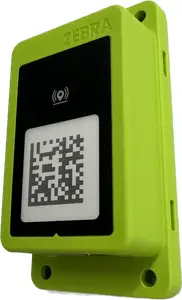 | Bluetooth adapter for connecting up to seven Zebra Bluetooth scanning devices configurable with 123Scan. | BT-RS5X6-DNGL-01 | $255.00 |
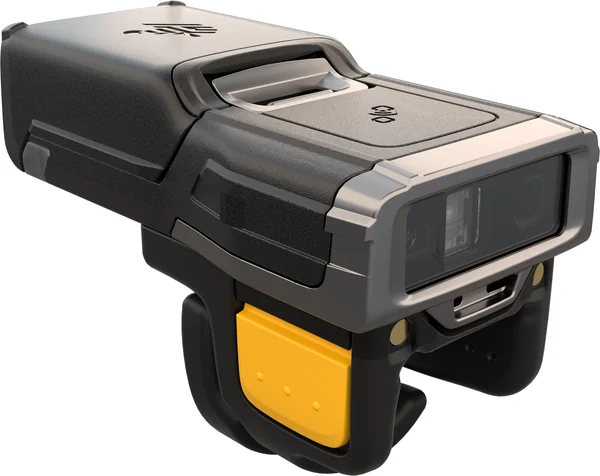
Find out what hundreds of thousands of IT administrators already know. Our 123Scan's patented wizard makes scanner configuration—and every step of deployment—incredibly easy.
Buy Zebra 123Scan from BackUp BarCode Systems, Inc.
| Image | Name | SKU | Price |
|---|---|---|---|
| Bluetooth adapter for connecting up to seven Zebra Bluetooth scanning devices configurable with 123Scan. | BT-RS5X6-DNGL-01 | $255.00 |
Online Documentation for Zebra Technologies developer tools and utilties including EMDK for Android, EMDK for Xamarin, StageNow, Enterprise Browser.
123Scan is an easy-to-use, PC-based software tool that enables the quick and easy set-up of Zebra scanners. With over 600,000 users worldwide, this is the single utility you will need to setup your Zebra scanner.
an architectural framework providing a single programming interface across multiple programming languages and across multiple system environments for all scanners communication variants.
Zebra OPOS Driver which enables bar code data communication between any scanner and an OPOS compliant POS application via either a USB or RS-232 connection.
An application accesses the JavaPOS device through the JavaPOS Device Interface, which is specified by Java interfaces.
Real Time Alerts let a Zebra scanner notify the host when a monitored statistic reaches a threshold or an event occurs. Covers how alerts work and how to receive them through CoreScanner, OPOS and JPOS.
A lightweight, cross-platform console application that manages and persists Real Time Alert (RTA) configurations on connected Zebra scanners, re-applying them automatically each time a scanner reconnects.
This documentation provides a detailed guide on using PowerShell scripts to interact with Zebra scanners via the scanner SDKs.
Using a free provider plug-in from Zebra, WMI enables local and network remote management of a scanner.
The SMS enables your enterprise to remotely manage its Zebra scanners. In addition to accessing asset tracking information and statistics, the SMS can set parameters and update firmware.
IoT Connector is a simple logging tool that will log events related to scanners to a text file. It can be configured to write the logs to several places like console and a text file at the same time or only to one of them.
DataWedge for Scanners (DWS) keeps track of which window has active focus on the computer and configures the scanner to send data to meet this window’s input needs.
The Scan-To-Connect (STC) Utility simplifies the pairing process for Zebra Bluetooth scanners with a PC/tablet. It enables multiple Zebra Bluetooth scanners to pair with a PC/tablet in one simple step, without having to modify your app.
The Color Camera SDK for Windows provides the ability to manage camera connections, perform various operations, configure and retrieve information related to connected cameras.
The Software Development Kit (SDK) for Linux enables a developer to create an application that can control a Zebra scanner. The SDK also includes a JPOS driver for Linux.
An application accesses the JavaPOS device through the JavaPOS Device Interface, which is specified by Java interfaces.
Real Time Alerts let a Zebra scanner notify the host when a monitored statistic reaches a threshold or an event occurs. Covers how alerts work and how to receive them through CoreScanner, OPOS and JPOS.
A lightweight, cross-platform console application that manages and persists Real Time Alert (RTA) configurations on connected Zebra scanners, re-applying them automatically each time a scanner reconnects.
The Scanner Management Service (SMS) enables your enterprise to remotely manage its Zebra scanners. In addition to accessing asset tracking information and statistics, the SMS can set parameters and update firmware.
IoT Connector is a simple logging tool that will log events related to scanners to a text file. It can be configured to write the logs to several places like console and a text file at the same time or only to one of them.
The CLU (Command Line Utility) is an executable that enables Linux users to manage scanners from a terminal prompt or shell/bash script.
The Color Camera SDK for Linux provides the ability to manage camera connections, perform various operations, configure and retrieve information related to connected cameras.
The Color Camera SDK for Python (Linux) provides installation and programming information that allow Bioptic Color and Monochrome camera enabled application development for Linux operating system using Python.
The Zebra Scanner SDK for Android enables cordless scanners to be connected and controlled by a tablet / smart phone without using a cradle, after pairing over Bluetooth.
Pair a Zebra cordless scanner to an Android phone or tablet by scanning an on-screen barcode, then receive scanned data in any app as keyboard input.
The Zebra Scanner Control app enables Zebra cordless scanners to be connected and controlled by a iPhone/iPad after Bluetooth pairing.
The Scan-To-Connect (STC) Utility enables up to 7 Zebra Bluetooth scanners to pair to a PC / tablet, each in one simple step, without having to modify your app.
Zebra Scanner SDK for Xamarin enables a developer to build native applications to connect and control Zebra Barcode scanners over a Bluetooth connection (no cradle involved) on iOS and Android devices from a single, shared C# codebase.
Zebra RFID SDK for Xamarin enables a developer to build native applications to connect and control Zebra Barcode scanners over Bluetooth on iOS devices from a single, shared C# codebase.
The Scanner Software Development Kit (SDK) for Chrome allows developers to create Chrome apps. These apps can be run on any Chromebook and Chromium device. In addition, these apps can be run within a Windows Chrome browser version 69 or newer.
Zebra .NEW MAUI Wrapper for Scanner SDK enables a developer to build native applications to connect and control Zebra Barcode scanners on iOS and Android devices from a single, shared C# and XAML codebase.
Search our online knowledge base of thousands of helpful articles to quickly and easily find the answer to most product support questions. Use the search bar or browse by products to access thousands of knowledge articles that answer product support questions.